


Best 

Elgato Game Capture Neo Specs: Share Your Gameplay With Ease!
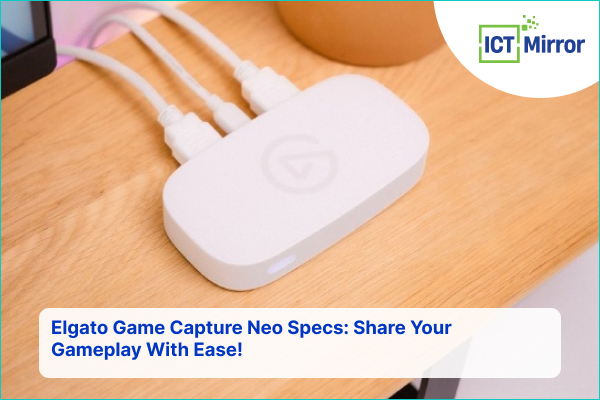
Elgato Game Capture Neo Specs. Image Credit: Instagram.
Imagine recording the most memorable video game scenes with vivid picture quality and no typical difficulties. With the Elgato Game Capture, you can now broadcast and share your triumph.
Dive into the Elgato Game Capture Neo specs and decide whether it is the ultimate tool for capturing your victory in 4K quality. As a content creator, you can share your gameplay in real time with numerous fans.
Are you ready to examine the specifications, discover their strengths and weaknesses, and join gamers worldwide? Stay tuned because what you will learn may revolutionize your gaming experience.
About the Elgato Neo Tools
Say hello to Elgato’s new line-up product, Neo, the most accessible professional tool anyone can use. It does not require technical skills to look and sound professional online.
With Neo, you get everything you need: crystal-clear sound quality, good video, and logical control in video meetings, live streaming, or voice conferencing.
Explore the Neo lineup: Key Light Neo, Stream Deck Neo, Facecam Neo, Game Capture Neo, and Wave Neo. These tools help you get things done and design like a boss wherever you are.
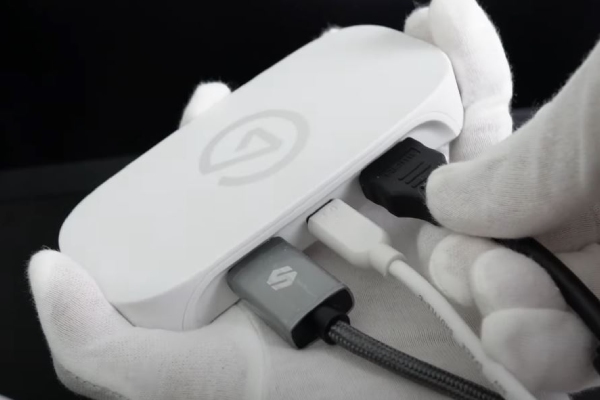
Elgato Game Capture Neo Specs. Image Credit: Social Media.
For this reason, professionals and creators are already using Neo to redesign their online experience. Whether it is a business proposal presentation or a podcast about plants, Neo will fit whatever is required. Today, let us discuss Elgato game capture Neo specs.
Elgato Game Capture Neo: Record Or Stream Like A Pro
Experience the ultimate gaming with the Elgato game capture Neo specs. It is a compact device no larger than a smartphone. Setting up your console, gaming screen, computer, iPad, or similar device doesn’t take long.
Record your gameplay directly from PlayStation, Xbox, Switch, or any console without restrictions or limitations—there are no time limits, watermarks, or subscriptions.
Play games at UHD 4K 60 HDR pass-through without losing console quality while recording or streaming in 1080P 60.
Elgato Game Capture Neo Specs. Image Credit: Social Media.
Stream with ultra-low latency and quickly toggle between applications such as Elgato software, OBS Studio, QuickTime, Discord, MS Teams, and Zoom.
Also, the Neo Line has been developed with an environmentally friendly approach, which means that there will be no plastic packaging.
ALSO READ: ASUS ROG NUC 970 Full Review: Compact And Powerful Mini Gaming PC
How to set up Game Capture Neo For PS, Xbox, and Ninnendo?
The setup of the Elgato game captures Neo in different accessories, which is easy. However, you should have an HDMI cable, which is not provided.
For PlayStation
- Connect your PlayStation 5 to the HDMI In of game capture Neo via an HDMI cable.
- Connect the HDMI Out of game capture Neo to your TV or display.
- Connect the game capture Neo to your computer via a USB cable.
- Open the 4K capture utility to start capturing immediately, or add the game Capture Neo to your preferred streaming software, such as the 4K capture utility, OBS Studio, XSplit, Streamlabs Desktop, and more.
For Xbox Series X|S
- Connect your Xbox Series X|S to the HDMI In of game capture Neo via an HDMI cable.
- Connect the HDMI Out of game capture Neo to your TV or display.
- Connect the game capture Neo to your computer via a USB 3.0 cable.
- Open 4K capture utility or OBS studio to start capturing immediately, or add game capture Neo to your preferred streaming software.
For Nintendo Switch Setup
- Navigate to Nintendo Switch system settings > TV settings.
- Set the TV resolution to 1080p or 720p, set the TV sound to stereo, and disable the TV power state.
- Connect your Nintendo Switch dock to the HDMI In of game capture Neo via an HDMI cable.
- Connect the HDMI of Game Capture Neo to your TV/Monitor via a cable.
- Connect the game capture Neo to your computer via a USB cable.
- Open the 4K capture utility to start capturing immediately, or add the game Capture Neo to your preferred streaming software.
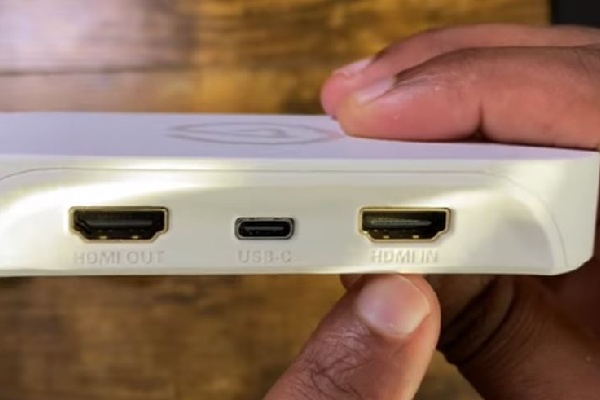
Elgato Game Capture Neo Specs. Image Credit: Social Media.
Through the Elgato game capture Neo specs, the product won a VGP Award. This product marks industry specialty awards and consumer approval for superior performance, appearance, and creativity in the audiovisual technology industry.
Similarly, you can also read Asus Bijou ROG NUC 970 Review.
Elgato Game Capture Neo Specs
Some of the specifications of the product are listed in the table below.
| Specifications | Info |
| Input | HDMI (unencrypted) |
| Output | HDMI (lag-free passthrough) |
| Passthrough resolution | Up to 4K60 HDR |
| Recording resolution | Up to 1080p60 |
| Dimensions | 123 x 65 x 20 mm / 4.8 x 2.6 x 0.8 inch |
| Capture | 1080p60, 1080p30, 1080i, 720p60, 576p, 480p |
| System requirements |
|
| Supported Sources |
|
| Supported Software |
|
| Interface |
|
| Weight | 90 g / 3.2 oz |
Table Source: Elgato
When you buy this product, you will find game capture Neo and USB-C to USB-A 3.0 braided cable (100 cm/39.4 in).
Read our other article 2024 HyperX QuadCast 2 Mic Specs.
Pros and Cons
Some of the merits and demerits of Elgato game capture Neo specs are listed in the table below.
| Pros | Cons |
|
|
Table Source: xda
This game capture is available for $99.99 on Amazon and Elgato’s official site. Currently, it is out of stock on Amazon.
Elgato Game Capture Neo Customers Review
One of the buyers from Amazon talked about Elgato game capture Neo specs.
It is easy to set up and can connect to a PS4/PS5/switch/laptop/desktop PC. The quality of the recording is spot on. The game capture is relatively small and sits nicely on the desk. I recommend it if you are starting to record games for YouTube.
Another buyer from Amazon gave five stars and said:
What do I like about this? Of course, the price point was super affordable for me to start content creation for the platform I used regularly. It’s tiny and straightforward to use. I think future content creators will use this as their first capture card for a while or maybe a long time.
Similarly, another verified customer said:
Game Capture Neo is a excellent capture card device, definitely would recommend. This can get the job done and it is very useful. Works great on macOS and iPadOS.
As you can see, the buyers’ reviews are good on Elgato’s official website and on Amazon. Every customer is satisfied with the product, which provides several features at an affordable price.
FAQ
Q. What is Elgato suitable for?
A. Elgato is suitable for capturing the signal from a game console to a TV or monitor.
Q. Can I use Elgato without a PC?
A. Game Capture 4K60 S+ can be recorded on an SD card without requiring a PC.
Q. Is Elgato a Chinese company?
A. No, it is a Germany and California-based Company.
ictmirror.com contains affiliate links. Meaning ictmirror.com receives commissions for purchases made through those links, at no cost to you.


Did you notice an error ?
Please help us make corrections by submitting a suggestion. Your help is greatly appreciated!
Top Related Articles
There are many variations available but the majority