

Cameras 

Logitech MeetUp 2 BYOD Specs: Truly A Next-Gen AI Driven Video Bar
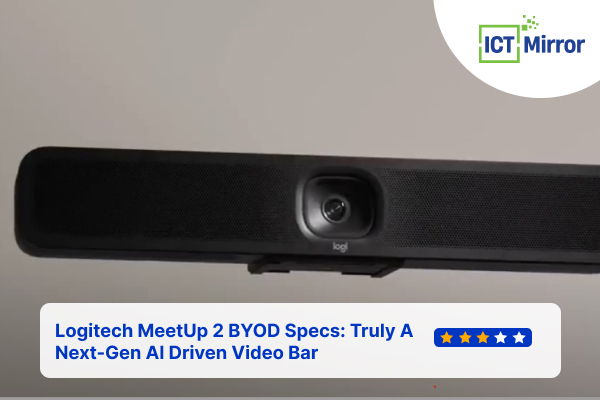
Logitech MeetUp 2 BYOD Specs. Image Credit: Social Media.
Workplace and video conferencing will be enhanced with the newly announced Logitech MeetUp 2. This new product from Logitech is a Bring-Your-Own-Device (BYOD) System, perfect for small meeting spaces.
This article will reveal the Logitech MeetUp 2 BYOD specs, price, and latest features. Better and more convenient than ever, MeetUp2 is an upgraded version of MeetUp, the best-selling conference camera in Logitech’s history.
As companies embrace hybrid work models, Logitech’s new conference camera might be one of the best options.
MeetUp 2 is Designed for Modern Collaboration
MeetUp 2 is an AI-powered USB conference camera designed for BYOD and PC-based setups in huddle areas. The simple setup and user-friendliness features make your meetings more practical and hassle-free.
MeetUp 2 is flexible, whether it is a dedicated PC-based setup or employees bringing their own devices, such as laptops or tablets.
Two features make Logitech MeetUp 2 BYOD Specs even more amazing: USB or BYOD modes. During the meetings, you can display information on monitors in your rooms by enabling digital signage with Logitech Sync and other platforms like Microsoft Teams, zoom, and Google Meet.

Logitech MeetUp 2 BYOD Specs. Image Credit: Social Media.
It’s just like a plug-and-play device with excellent specs and quality. MeetUp 2 also has RightSound 2 technology, ensuring everyone is heard and the meeting is smooth.
The MeetUp 2 is a remarkably compact, compatible, modern video conferencing bar with a high-definition camera, beamforming microphones, and full-range speakers.
Improved Visuals and Sounds With AI Features
Logitech has integrated AI on this device, ensuring all participants are seen and adjusting the field of view. Even other webcam companies use AI features such as Insta360 Link.
MeetUp 2’s 4k camera uses a de-warper algorithm, providing a 120-degree field of view (FoV). The camera supports Logitech’s intelligent framing solution, ‘RightSight 2.’ It also has up to a 4X zoom, just like Logitech MX Brio.

Logitech MeetUp 2 BYOD Specs. Image Credit: Social Media.
Also, RightSound 2 helps in advanced voice equalization and cancels most of the unwanted background noises. See the table below and see how MeetUp 2’s AI audio and video features work.
| AI Feature | Options | AI Feature | Options |
| Right Sight 2 |
| Right Sound 2 |
|
Table Source: Logitech
It has an optional Active USB cable to make your video conference genuinely excellent, ensuring a cable connection for both power and video.
Although compact and sleek, it makes up for it with its Logitech MeetUp 2 BYOD Specs. It has everything you need for a video conferencing product.
ALSO READ: Corsair One i500 Prebuilt PC Review: The Most Amazing Compact Gaming PC!
Logitech MeetUp 2 BYOD Specs
MeetUp 2 includes multi-mount and attach features. You can attach it to a display, table, or wall. Also, it has a built-in threaded insert that is compatible with tripods.
Now, let us go through Logitech MeetUp 2 BYOD Specs in detail.
| Specification | Type | Info |
| General Specifications | Enclosure Device Management Displays Supported Display Resolution | All-in-one enclosure Logitech Sync BYOD mode: 1; Dedicated 1080p |
| Camera | Resolution Vertical Field of View Diagonal Field of View Horizontal Field of View Zoom | 4K 80° 120° 113° 4X HD digital zoom |
| Speakers | Rated Power Speaker Sampling Rate Driver: | 8W THD at 1W, 1kHz : <2% 48KHz 2.17 in (55 mm) |
| Interfaces | HDMI Out HDMI In USB Network | 1 1 1 x Type C USB 3.1 10/100/1G Ethernet |
Table Source: Logitech
For easy BYOD, Logitech has implemented Display Port Alternative Mode (DP Alt Mode), where you will not require multiple cables. The mode enables a USB-C connection to transmit and carry Display Port video signals.
Should You Buy The MeetUp 2? Comparing With MeetUp 1
Logitech MeetUp 2 is made up of 62% certified post-consumer recycled plastic. Likewise, the paper packaging comes from FSC certifies forests. Thus, this device is eco-friendly.

Logitech MeetUp 2 BYOD Specs. Image Credit: Social Media.
If you have a small business with a small conference room, this is the perfect solution to up your business with high-quality video conferencing without breaking your budget.
Also, for those who are in remote teams and want to collaborate and work with another team, this is the perfect option to keep improving your team and increase your team coordination.
| Features | MeetUp2 | MeetUp 1 |
| Room Type | Huddle and Small | Huddle and Small |
| Single Cable BYOD | Yes (DP Alt Mode) | No |
| Digital Signage | Yes | No |
| Remote Management with Sync | Yes, via ethernet or wifi | Yes, via Sync app |
| Mounting | 3-way mount: Table, Display, Wall | Shelf and Wall |
| Cable Management | Yes | No |
| AI Video | Right Sight 2 | No |
| AI Sound | Right Sound 2 | Right Sound |
| Pickup Range | Up to 23 ft | Up to 16.4 ft |
| Eco-Friendly | Yes | No |
Table Source: Logitech
Although Logitech has designed MeetUp 2 for business, educational institutions can also take full advantage of this product. This is essential for your institution if you want more interaction and improved classroom communication.
A Simple, Effective, and Modern Solution
As you can see, the Logitech MeetUp 2 BYOD specs are tempting enough.
MeetUp 2, priced at $899, will be available starting August 2024. You can pre-order the product from Logitech’s official website or an authorized seller like Amazon.
If you want to improve your meetings, teamwork, and communication but have a small space, MeetUp 2 is the perfect option.
ictmirror.com contains affiliate links. Meaning ictmirror.com receives commissions for purchases made through those links, at no cost to you.
Did you notice an error ?
Please help us make corrections by submitting a suggestion. Your help is greatly appreciated!
Top Related Articles
There are many variations available but the majority