


TVs 

BenQ SW242Q Review: Is This Monitor Right for You?

By William Jones - Oct 8, 2024 | Updated On: 08 October, 2024 | 4 min read
By William Jones , 4 min read - Oct 8, 2024
Updated On: 08 October, 2024

BenQ SW242Q Review. Image Credit: X.
The ultimate monitor for photographers and videographers is now available. BenQ provides a fantastic functional monitor that takes your passion to the next level of creativity.
In this BenQ SW242Q review, we will cover all the essential information, such as the features, specifications, advantages, and disadvantages. The monitor has a nice build quality and feels compact in appearance.
The monitor amazingly provides 2560 × 1600 resolution and Pantone validation, which facilitates you with good color coverage as a content creator or a professional at work. Let’s find out more.
Features Of BenQ SW242Q
The feature sets this monitor provides cost much more money, even if some professionals and photo editors prefer a 4K panel.
BenQ SW2242Q has calman verification, factory collaboration, broad color coverage, an extra feature such as an SD card reader, and more. In the field of photo editing monitors it’s one of the best to own.
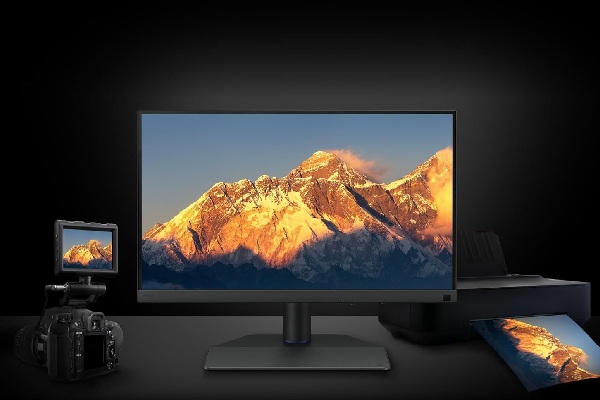
Obviously, it has strong connectivity features with the usual HDMI and Displayport interfaces. The BenQ also has two USB-A hub ports and an SD card slot.
BenQ SW242Q Review. Image Credit: X.
Are you concerned about the pixel density caused by its size? We understand why it’s so cause the norm of 24 inches, but don’t worry, that’s not the case here. The reason behind that is BenQ has slightly different plans; it’s 16:10 instead of 16:9.
This monitor offers 1600 vertical pixels, a more useful number than commonly seen on 2560 × 1440 panels, also known as 1440p. The higher resolution converts into 125 pixels per inch, a notable increase in the 92DPI of a standard 1080p 24-inch monitor.
BenQ SW242Q review mentions that it goes well with iOS because of the decent pixel density. The main highlight is the quality assurance of the IPS panel. That comes with factory-calibrated with sub 1.5 Deltae across the board.
The BenQ monitor also has 16-bit LUT support and 98% DCI-P3 digital cinema color space coverage. The 2K Adobe RGB works seamlessly on the monitor. What else? Let’s look at the specific details below.
BenQ SW242Q Review: Specifications
If you are interested in purchasing or just want to know about this amazing monitor, check out the necessary information in the specification table below.
| Specifications | Details |
| Brightness | 400 nits |
| HDR model | HDR10 |
| Native Contrast | 1000: 1 |
| Refresh Rate | 60 Hz |
| Color Gamut | sRGB 100%, P3 98%, Adobe RGB 99% |
| Color Mode | Adobe RGB, DCI-P3, Display P3, Rec.709, sRGB, HDR, M-Book, B+W, Calibration 1, Calibration 2, Calibration 3, Custom, Paper Color Sync, DICOM |
| Display colors | 1.07 billion colors |
| Audio | Headphone Jack |
| Power consumption | Normal-27W, Max-170W, Sleep mode-0.3W |
| Dimensions | 452.59 – 572.59 mm x 533.2 x 262.6 mm |
| Net weight | 7.8 Kg |
| Connectivity | USB C-PowerDelivery 90W, DisplayPort Alt Mode, Data, USB Type B-Upstream, USB 3.1-Downstream, Card Reader-SD/SDHC/SDXC/MMC, HDMI v2.0, DisplayPort v1.4 |
| Certification | TUV Certificate, Pantone SkinTone Validated, Pantone Validated, Calman verified |
| Software | Paper Color Sync, Palette Master Ultimate, Calman Ready, LightSpace Ready, Display Quickit |
Table Source: benq.com
The above table provides all the information needed to know before making any purchase, though you have to buy the hood separately. Let’s move on to the next topic.
ALSO READ: Asus ROG Strix XG27UCG Review: The Versatile Gaming Monitor
Pantone Connect Premium
The BenQ SW242Q review mentions it’s the first working brand with Pantone in/for a mobile phone app. This would surely facilitate new purchasers and old owners.
BenQ SW242Q Review. Image Credit: X.
Every customer would be provided with one year of free Pantone Connect premium for digital phone color accuracy and consistency, which is beneficial for professionals and photographers.
Palette Master Ultimate: Calibrators Compatible
The BenQ SW242Q review calibrators’ compatibility with the Palette master ultimate are listed below:
- i1Display Pro
- i1Display Pro Plus
- ColorChecker display pro
- Calibrite Display Pro HL
- ColorChecker display plus
- Calibrite Display plus HL
- i1Studio
- ColorChecker Studio
- i1Pro 2
- i1Pro 3
- i1Pro 3 Plus
- Spyder X
- Spyder X2
Hardware calibration has been simplified with precision and a premium palette master ultimate. Let’s move forward to the remaining uncovered topics in detail.
Design & Hood
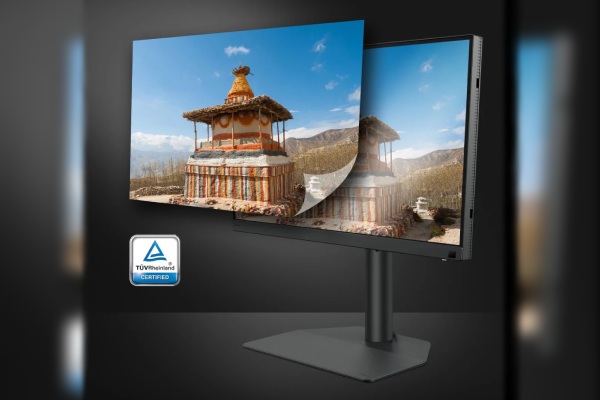
First of all, as the BenQ SW242Q review mentioned, you will get an ergonomically accessible design. The monitor is designed with your comfort in mind, with accessible I/O ports, and transfers data with the built-in card reader.
It also streamlines your work for maximum convenience. The BenQ has it all, with an elegant leatherette base that not only gives you a good impression but also saves your space.
BenQ SW242Q Review. Image Credit: X.
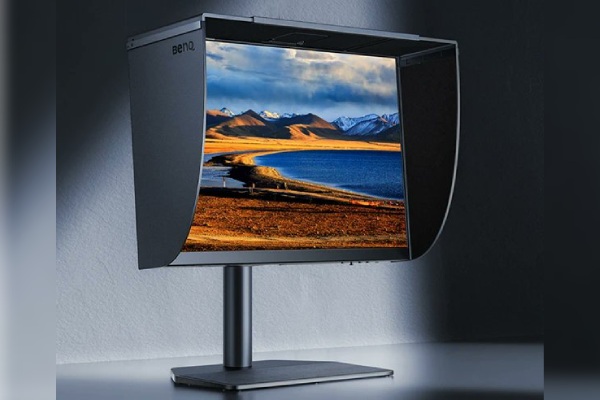
Also, the BenQ SW242Q offers an optional shading hood for you, which is designed to effectively reduce unwanted glare from ambient lighting. The shading hood provides assured color accuracy to all photographers.
Pros & Cons
Each product comes with its benefits and loopholes, which you find out later after owning one, but with our BenQ SW242Q review, that’s not the case. Just check it out.
| Pros | Cons |
|
|
Table Source: benq.com
The pros and cons provide you with an idea of what it would be like to own one, so choose wisely before making any purchase, paying attention to details and what you desire or want to purchase.
Price & Availability
Regarding availability, the BenQ SW242Q review mentions that it’s available on the official site and in other retailers online, like Amazon and BenQ stores.
The BenQ SW242Q costs around $479.99. The other version, 27″ QHD, 99% Adobe RGB, costs $799.99; both are available at Amazon and its official site. Now, something interesting in the last.
BenQ’s Green Commitment
BenQ practices eco-friendly product development as much as possible and prioritizes it like no other tech firm. Even as a customer, one should note that their commitment is based on sustainability.
The monitors made by BenQ professionals incorporate eco-friendly technology, recycled materials, and energy-efficient design. You would be surprised to know that they perform 85% of the PCR, which means over half of the product is made from post-consumer recycled material.
They certainly don’t wanna support the degradation of the world’s wealth, which means the environment, so they develop or manufacture recyclable packaging. And now the technical part comes at last.
BenQ monitors have an auto power-off system built, which conserves energy by automatically shutting down the screen after 10, 15, or 30 minutes of inactivity, which promotes sustainability.
FAQ’s
Q: Is the BenQ monitor really good for the eyes?
A: Monitors with low blue light filters block out harmful blue light to provide optimal eye protection. You wouldn’t want to be hindered from peak performance by Computer Vision Syndrome (CVS).
Q: Why is BenQ so popular?
A: BenQ screens offer an extensive range of acclaimed monitors and a distinctive value proposition of innovative performance and cutting-edge design.
Q: How long does BenQ last?
A: BenQ monitors are designed for normal use, with no restrictions on running 24 hours a day. A panel’s lifespan is around 20,000-30,000 hours.
ictmirror.com contains affiliate links. Meaning ictmirror.com receives commissions for purchases made through those links, at no cost to you.

Did you notice an error ?
Please help us make corrections by submitting a suggestion. Your help is greatly appreciated!
Top Related Articles
There are many variations available but the majority