


Laptops 

Alienware AW2725QF Review: Gaming Monitor With Unmatched Value

By Sam Kendrick - Sep 30, 2024 | Updated On: 30 September, 2024 | 4 min read
By Sam Kendrick , 4 min read - Sep 30, 2024
Updated On: 30 September, 2024

Alienware AW2725QF Review. Image Credit: Social Media.
The gaming world has mixed reactions towards Dell’s latest offering, the Alienware AW2725QF. The 27″ monitor has many exciting features and promises decent value for money.
Our Alienware AW2725QF review examined its design, functionality, performance, and how it compares to its competitors.
Key characteristics, such as the dual-mode panel, make the monitor one of the best-valued gaming monitors on the market. Now, let’s find the other features which increase that value.
Dual Screen Design
Dual-mode functionality is undoubtedly one of the AW2725QF’s prominent features. This top-notch technology allows users to toggle seamlessly between 4K 180Hz and 1080p 360Hz.
But how does this dual mode work, exactly? Well, let’s look at some of the science behind it. Due to pixel doubling, the monitor reaches a 1080p display where each “native” pixel comprises four smaller pixels.
The result of such an achievement is a 1080p mode featuring a refresh rate of 360 Hz, which seriously elevates gaming to a whole new level.
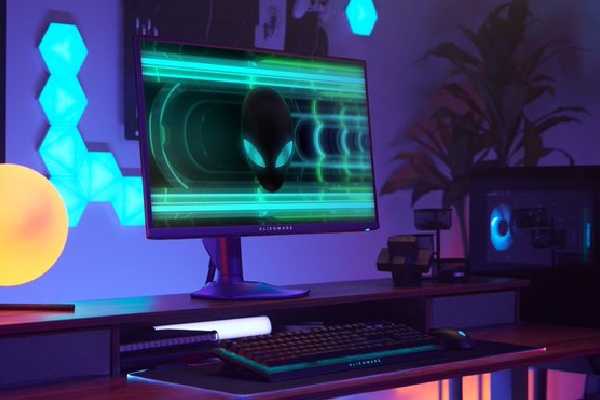
Alienware AW2725QF Review. Image Credit: Social Media.
Such flexibility caters to productivity and fast-paced gaming, with custom-tailored experiences for different user needs. The Dell Alienware AW2725QF is sleek, with slim bezels and a minimalistic rear with a premium feel and finish.
Apart from this, the build quality is high-class, with first-grade plastic used and a sleek finish. The afterglow of the RGB LED lighting boosts its look and makes it aesthetically appealing.
These unique features make it one of a kind for under $600, offering great value.
Visual Quality
The dual-screen setup raises the question: Does the dual-mode functionality truly enhance the gaming experience without compromising image quality? The answer is no.
The screen on the Alienware AW2725QF has incredible color saturation and excellent accuracy, with 95% DCI-P3 and 71% Rec. 2020 color space.
Whether immersing yourself in visually captivating game environments or engaging in color-sensitive design work, the monitor’s display exudes precision and richness.
Its sRGB mode further enhances color accuracy, making it an enticing option for users who prioritize visual fidelity.

Alienware AW2725QF Review. Image Credit: Social Media.
With a Delta E ITP average of 3.72 and effective gamut emulation, the screen’s color accuracy is a standout feature, elevating the user’s viewing experience to new heights of immersion and detail.
The AW2725QF’s DisplayHDR 600 certification and 450 nits SDR brightness promise a vibrant and visually arresting display. However, the absence of full-array local dimming warrants scrutiny regarding its HDR performance and contrast levels.
So you got the answer. With the dual-refresh rate setup, you do not have to worry about the colors and visual experience.
ALSO READ: Red Magic Titan 16 Pro 240Hz Specs: Features, Pros, And Cons
Performance Prioritizes Gaming
Performance is essential in gaming, and the AW2725QF delivers a punch. The Alienware AW2725QF’s remarkable performance centers on its 180 Hz refresh rate in 4K mode.
Its variable overdrive performance at different refresh rates allows for a customizable experience catering to diverse gaming preferences.
Moreover, the monitor’s whopping 0.5 ms GTG response time ensures minimal motion blur and input lag, benefiting fast-paced gamers.
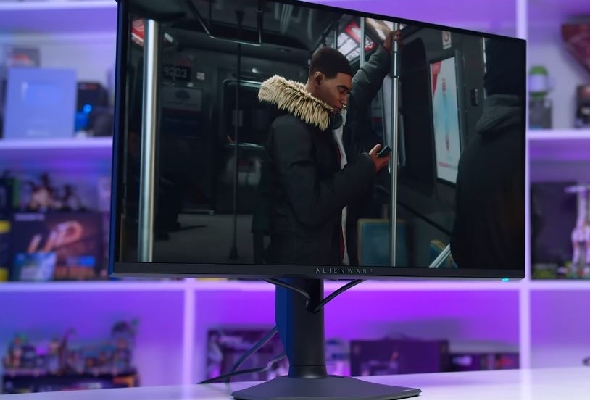
Alienware AW2725QF Review. Image Credit: Social Media.
With minimal input lag and the ability to deliver consistent performance across refresh rates, the monitor is a formidable companion for competitive multiplayer gaming.
Thanks to the NVIDIA G-SYNC integration, compatible with the VESA AdaptiveSync, gamers will get unmatched visuals while enjoying their favorite game.
Wide Range of Connectivity Options
The Alienware AW2725QF sports a highly versatile connectivity system that caters to the needs of various users. First, it comes equipped with not one but two HDMI 2.1 ports.
This will allow you to make the most out of this port version’s high bandwidth. This means you should have no problem seamlessly transmitting high-resolution content alongside high refresh rates.
Not to mention, DisplayPort 1.4 further expands the connectivity spectrum, offering room for different system configurations.

Alienware AW2725QF Review. Image Credit: Social Media.
Equipped with several USB-As and a USB-C, a USB hub makes it easy to connect the latest accessories and assures that users can interface effortlessly with other devices or accessories.
This complete suite of connectivity options extends the monitor’s flexibility, making it well-positioned to integrate multifaceted gaming and multimedia setups with multiple endpoints.
The one huge drawback of this monitor is its lack of a 3.5mm headphone jack. This would have been forgivable if it had internal speakers, but sadly, it does not.
Alienware AW2725QF Specifications
AW2725QF has some best-in-class specifications, making it one of the best monitors you can get.
| Specifications | Details |
| Number of Screens | 1 |
| Screen Size Class | 27″ |
| Viewable Screen Size | 27″ |
| Screen Mode | 4K FHD |
| Panel Technology | In-plane Switching (IPS) Technology |
| Response Time | 0.5ms GTG, Extreme mode 1ms GTG |
| Aspect Ratio | 16:9 |
| Viewing Angle | 178° (Both Horizontal and Vertical) |
| Mount Type | Panel Mount |
| Backlight Technology | Edge LED |
| HDCP Supported | Yes |
| Maximum Adjustable Height | 4.33″ |
| Tilt Angle | -5° to 21° |
| Swivel Angle | -20° to 20° |
| Pivot | -90° to 90° |
| Stand Adjustments | Swivel, Height, Pivot, Tilt |
| Stand Included | Yes |
| Glass Hardness | 3H |
| Low Blue Light | Yes |
| Resolution | 3840 x 2160 |
| Standard Refresh Rate | 180 Hz |
| Color Supported | 1.07 Billion Colors |
| Brightness | 400 nits General, 600 Max |
| Color Gamut | 95% DCI-P3 |
| Interfaces/Ports |
|
| Power Consumption |
|
| Physical Dimensions |
|
| Miscellaneous |
|
Table Source: Alienware
These specifications are not commonly found in monitors with prices starting from $600, which makes the Alienware AW2725QF unmatched in the price bracket.
Similarly, you might also like to read about Best 11 Native 24-34 Inch G-Sync Monitors For Gaming .
Pros and Cons
Although it has some ground-breaking technologies, some things are hard to ignore.
| Pros | Cons |
|
|
These cons have made some other monitors in a similar price bracket look better in terms of value, but the monitor’s advantages make up for it.
Value Proposition – Should You Buy It?
Pricing is often a critical determinant of the success or failure of technological products, primarily gaming products. The value proposition of the Alienware AW2725QF is no exception.
With an exciting price tag of $599 reflecting its premium features and dual-mode innovation, potential buyers are confronted with a fundamental question: Does the monitor truly justify the price premium, especially compared to alternatives in the market?
That might be a skeptical question with varying answers from users to users. The Alienware might be expensive if you value having an audio jack and full-array dimming. If so, the Acer Predator XB273K V5 might be cheaper and better.
However, if you look at the features it does provide, like the dual-mode screen and the backing of brands like Alienware, you got yourself a value-for-money monitor.
The Alienware AW2725QF stands out as an ideal monitor with versatility. Despite some drawbacks and a questionable price, the monitor is a potential choice for work and gaming.
FAQs
Q: What is the screen resolution of the Dell Alienware AW2725QF?
A: The Alienware AW2725QF boasts a resolution of 3,840 x 2,160 (4K).
Q: What panel is present in the Alienware AW2725QF?
A: The screen is an IPS panel.
Q: Does Alienware AW2725QF have an audio line-out?
A: No, the Alienware AW2725QF does not have an audio line-out.
ictmirror.com contains affiliate links. Meaning ictmirror.com receives commissions for purchases made through those links, at no cost to you.

Did you notice an error ?
Please help us make corrections by submitting a suggestion. Your help is greatly appreciated!
Top Related Articles
There are many variations available but the majority