


Laptops 

The Best QD-OLED Gigabyte AORUS FO27Q3 Review

By Sam Kendrick - Aug 30, 2024 | Updated On: 09 October, 2024 | 5 min read
By Sam Kendrick , 5 min read - Aug 30, 2024
Updated On: 09 October, 2024

Gigabyte AORUS FO27Q3 Review. Image Credit: Social Media.
Gigabyte is mainly known for its feature-rich lines of gaming devices, and the latest AORUS FO27Q3 is no exception. This new gaming monitor is driven by advanced QD-OLED technology and a well-thought-out design.
Today, we will see a detailed Gigabyte AORUS FO27Q3 review and learn about its features. This monitor is a top contender for other displays using the same Dell and MSI panel.
Do the FO27Q3 monitor’s on-paper specs and features match its actual performance? You will soon find out!
Design and Aesthetics
Its neat-looking, gaming-focused design is appealing. Like its other displays, the Aorus FO27Q3’s subtle RGB lighting enhances its gamer-centric appeal.
Featuring a modern design with slim bezels and thin metal legs, the FO27Q3 talks aesthetics. The RGB LED highlights add to its allure and lend a futuristic appeal. But what truly sets this gaming monitor apart is its convenient port arrangement.
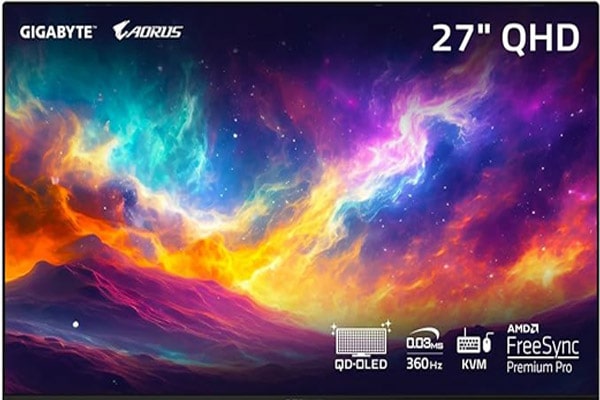
Best Pick
GIGABYTE - AORUS FO27Q3-27
Experience elite gaming with the GIGABYTE AORUS FO27Q3 - a 27
Indeed, the FO27Q3 impresses with its excellent mix of usability and functionality. If you are familiar with Gigabyte’s models, such as the Aorus G6X 9KG and the Aorus F032U2P, then you know they manufacture premium-built monitors.
Sleek contours and futuristic sets of RGB lighting set the stage, bezel-free display for the most immersive gaming experience. Or is it all style and no substance? Is this monitor packing some performance punch?
Gigabyte AORUS FO27Q3 QD-OLED Display
The Gigabyte AORUS FO27Q3 QD-OLED offers outstanding visual performance beyond any game enthusiast’s expectations. From the heart of OLED technology comes unmatched motion clarity and response times, meaning seamless immersion in your game.
Its QD-OLED 27-inch display features good visual performance, rich colors, and excellent clarity.
It has a 1440p resolution and crisp, explicit imagery. Its high refresh rate of 360Hz is ideal for ultrasmooth and responsive game action. The monitor shares the same refresh rate as the much-loved ASUS ROG Strix XG27AQDNG.
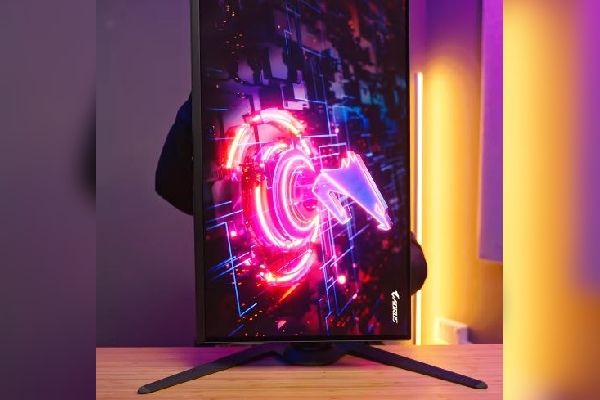
Gigabyte AORUS FO27Q3 Review. Image Credit: Social Media.
Further, thanks to its fast 0.03ms gray-to-gray GTG response time, this monitor reduces the amount of motion blur and ghosting observed when gaming at high speeds.
Beyond that, the AORUS FO27Q3 has a DisplayHDR True Black 400 rating, which provides even better contrast and deep black levels, resulting in a more immersive visual experience.
In addition, support for AMD FreeSync Premium Pro will let the monitor smoothly synchronize with compatible graphics cards and avoid screen tearing and stuttering to ensure fluid gaming.
AMD FreeSync is quite common in other monitors like the Asus ROG Strix XG27UCG
All these factors considered, the Gigabyte AORUS FO27Q3 360Hz QD-OLED gaming monitor is exceptional for those who want nothing but the best display and high performance in gaming.
ALSO READ: Red Magic Titan 16 Pro 240Hz Specs: Features, Pros, And Cons
Gigabyte AORUS FO27Q3 Features
During our Gigabyte AORUS FO27Q3 review, the monitor had no problems being run continuously for hours.
Equipped with superior input latency and almost no overshoot artifacts, the FO27Q3 will ensure an apparent and responsive game session each time. This makes it a perfect fit for gamers who seek outstanding performance, unrivaled visual clarity, and smoothness in a gaming monitor.
This monitor offers flexibility for optimal viewing comfort, featuring an adjustable stand with various ergonomic options. However, some minor design quirks, such as a narrow cable management gap and slightly cheaper-looking plastic in some areas, are notable.
The Gigabyte AORUS FO27Q3 Connectivity
Multiple connectivity options are available in the Gigabyte AORUS FO27Q3 for users’ convenience.
With HDMI, DisplayPort, and USB ports in the box, connecting gaming consoles, PCs, or peripherals is accessible without different adapters.
The DisplayPort and USB ports allow users to connect multiple devices, such as gaming consoles, PCs, and peripherals, without needing separate adapters.
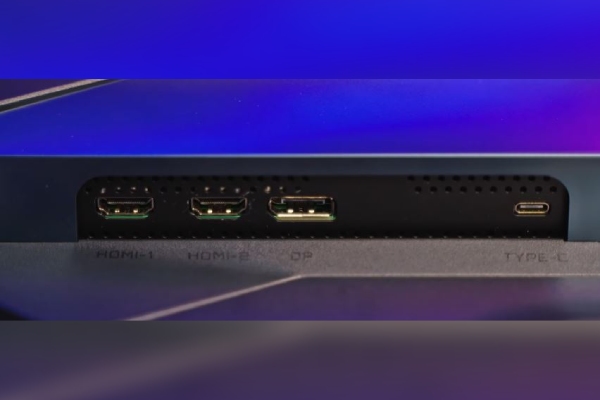
Gigabyte AORUS FO27Q3 Review. Image Credit: Social Media.
Multiple power cables for different countries ensure global usability, making this monitor versatile for gamers worldwide.
It supports seamless integration with diverse gaming setups, allowing users to enjoy a hassle-free gaming experience with minimal cable swapping or compatibility issues.
AORUS FO27Q3 possesses KVM
KVM (Keyboard, Video, Mouse) switches are commonly used in numerous gaming devices to operate one or more connected computers efficiently.
They have proven to be a staple tool among users who must switch between several computers using the same peripherals. However, they can be saved through increased speed and efficiency and better management, with costs and space-saving intentions.
Users can smoothly switch between the KVM switch with convenient port selection methods, such as physical buttons, keyboard hotkeys, or mouse wheel clicks.
Users can smoothly switch between computers connected to the KVM switch with convenient port selection methods, such as physical buttons, keyboard hotkeys, or mouse wheel clicks.
With the Gigabyte AORUS FO27Q3, you will have no problem switching between multiple computer/server controls. This is a nice feature in your monitor and costs around $800.
Moreover, during our Gigabyte AORUS FO27Q3 review, it played a vital role in reducing clutter, saving costs, saving space, and providing peripheral support.
KVM switches are available in various models, from 2-port desktop switches to models supporting up to 64 ports, making them ideal for different environments and applications.
They have advanced features such as USB peripheral-sharing capabilities and support audio signals, making them versatile for diverse use cases.
Gigabyte AORUS FO27Q3 Specifications
During our Gigabyte AORUS FO27Q3 review, we found the following specifications:
| Specifications | Details |
| Display Size | 26.5-inch 16:9 widescreen |
| Resolution | 2560×1440 |
| Brightness | 250 nits (rated average in SDR), 1,000 nits (3% window peak); 248.1 nits (tested in SDR), 470 nits (test in HDR 10% window peak) 870 nits (test in HDR 4% window peak), 985 nits (test in HDR 1% window peak) |
| Refresh rate | 360Hz |
| Panel technology | QD-OLED (GEN 3) |
| Speakers | Yes (5W x 2) |
| KVM switch | Yes |
| Variable refresh rate | Yes (AMD FreeSync Premium Pro) |
| HDR | Yes (VESA DisplayHDR True Black 400) |
| Price | $799 |
Table Source: Club386
After our Gigabyte AORUS FO27Q3 review, the specs look promising.
Pros and Cons
After our Gigabyte AORUS FO27Q3 review, we found some pros and cons, which we have mentioned below.
| Pros | Cons |
|
|
Gigabyte AORUS FO27Q3 review has pros and cons that will help you decide.
Gigabyte AORUS FO27Q3 Reviews From Users
Having looked at the Gigabyte AORUS FO27Q3 review, buyers have mixed reactions. One of the buyers mentions,
It is beautiful, brightness is good but gets a little washed out at full brightness.
Similarly, one satisfied user shared their feeling, saying,
The Gigabyte is sturdy and well made, there is height adjustment from 1-6 inches above your desk.
The reviews mentioned above are only a portion, and you can get the detailed analysis on Gigabyte’s official website.
Our Verdict
Conclusively, Gigabyte Aorus FO27Q3 has every quality one would want in an ideal monitor for gaming: top-class performance with immersive visuals, equally robust connectivity options, advanced customization options, and peerless color accuracy.
These gadgets come with sleek designs, a versatile connectivity option, and robust features, making them very tempting to gamers and content creators who need a premium display experience.
Despite some design quirks and considerations, the Aorus FO27Q3 is a flagship gaming monitor that delivers a fantastic gaming and multimedia experience.
It competes against popular names like Sansui S55VOUG OLED, Hisense U8N, and Sony inZone M10S (not launched yet). These all are available for $799 but serve a different purpose.
However, if the company reduces the price, the monitor will appeal to a broader audience. We hope our Gigabyte AORUS FO27Q3 review cleared all the doubts regarding this brilliant piece of tech.
FAQs
Q: When did Gigabyte AORUS FO27Q3 launch?
A: It was launched on Amazon on April 30, 2024.
Q: What type of screen type is the Gigabyte AORUS FO27Q3?
A: The Gigabyte AORUS FO27Q3 has a 2K QHD OLED screen.
Q: Does Gigabyte AORUS FO27Q3 have KVM?
A: Yes. Gigabyte AORUS FO27Q3 has KVM.
ictmirror.com contains affiliate links. Meaning ictmirror.com receives commissions for purchases made through those links, at no cost to you.


Did you notice an error ?
Please help us make corrections by submitting a suggestion. Your help is greatly appreciated!
Top Related Articles
There are many variations available but the majority